
Article Snapshot
Crypto Fundamentals Learning Path
- The Complete Beginner’s Guide to Cryptocurrency
- What Is Blockchain
- What Is Bitcoin
- What Is Ethereum
- What Are Smart Contracts
- What Is DeFi
- Crypto Wallets Explained
- What Are Stablecoins
- What Is Web3
- ► Cryptocurrency Security — You are here
In This Guide, You’ll Learn
- •What cryptocurrency security means
- •Why crypto security differs from traditional account security
- •How to protect seed phrases, wallets, exchange accounts, and devices
- •How to recognize phishing, impersonation, investment, and recovery scams
- •How to review wallet connections, signatures, and token approvals
- •How to verify transactions before approval
- •What to do after a suspected compromise
- •How to build a personal cryptocurrency security system
Introduction
Cryptocurrency gives people new ways to store, transfer, and manage digital assets. However, that control comes with an important responsibility: you must protect the accounts, wallets, devices, and information that provide access to your crypto.
The good news is that you do not need to become a cybersecurity expert. A small set of consistent habits can help you avoid many of the mistakes and scams that affect beginners.
Cryptocurrency security means protecting everything that can provide access to your crypto or authorize an action involving it.
That includes seed phrases, private keys, passwords, email accounts, devices, wallet connections, and transaction decisions. A blockchain network can continue working as designed while an individual still loses crypto through a compromised account or deceptive request.
According to the FBI’s 2025 Internet Crime Report, cryptocurrency investment fraud resulted in approximately $7.2 billion in reported U.S. losses during 2025. That figure covers one category of fraud, but it shows why practical security education matters.
The BrettWy Cryptocurrency Security Framework
Use this five-part model to build security around access, everyday actions, and recovery:
- Access: Protect passwords, email, authentication methods, private keys, and recovery information.
- Devices: Keep phones, computers, browsers, wallets, extensions, and backups secure and current.
- Actions: Verify websites, addresses, networks, amounts, signatures, permissions, and transactions before approval.
- Separation: Limit exposure by separating long-term storage, exchange accounts, and wallets used with unfamiliar applications.
- Response: Prepare in advance for lost access, suspicious activity, exposed credentials, or a compromised device.
Table of Contents
What Is Cryptocurrency Security?
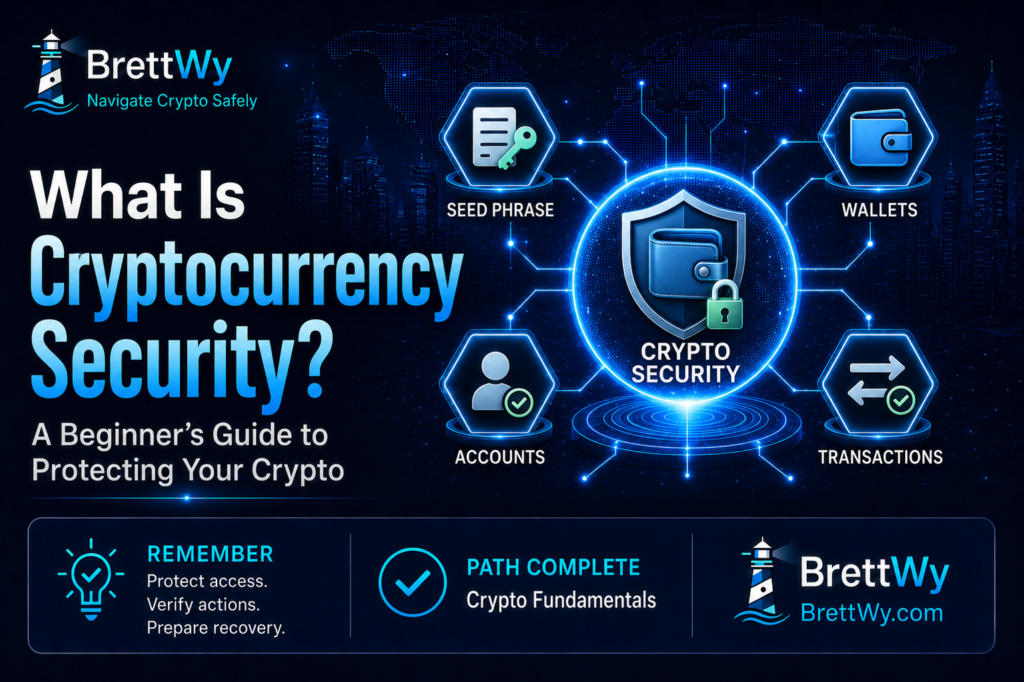
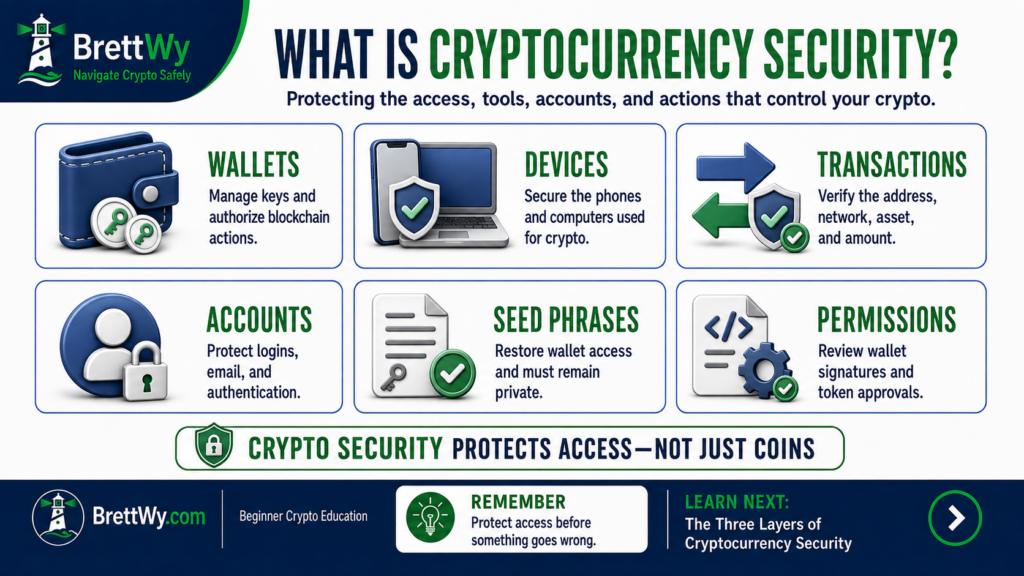
Cryptocurrency security is the process of protecting the information, tools, accounts, and actions that control access to digital assets.
It includes protecting wallets, exchange accounts, seed phrases, private keys, passwords, authentication methods, devices, backups, and smart-contract permissions. Effective security uses several safeguards because no single password, device, or product can prevent every type of loss.
What Are You Actually Protecting?
Cryptocurrency remains recorded on a blockchain. A crypto wallet manages the information used to interact with the assets associated with a blockchain address.
- Account authority: access to a custodial platform
- Wallet authority: control of a self-custody wallet
- Transaction authority: the ability to send crypto or approve an action
- Recovery authority: the information used to restore access
- Permission authority: access granted to a smart contract
If someone gains one of these forms of authority, that person may not need to attack the blockchain. The attacker may already have what is needed to access an account, restore a wallet, or authorize an unwanted action.
Why Cryptocurrency Security Is Different
Traditional security practices still matter. Strong passwords, updated devices, and phishing awareness remain essential. Nevertheless, cryptocurrency adds several responsibilities.
Transactions May Be Difficult to Reverse
Once a blockchain confirms a transaction, there is usually no central administrator who can simply cancel it. Prevention and verification are therefore especially important for Bitcoin transactions and other blockchain transfers.
Custodial vs. Self-Custody Security
A custodial platform controls the private keys and provides an account-recovery process. The user still protects the password, email, authentication method, and device. Self-custody removes some dependence on a company but makes the user responsible for seed phrases, backups, transactions, and wallet permissions.
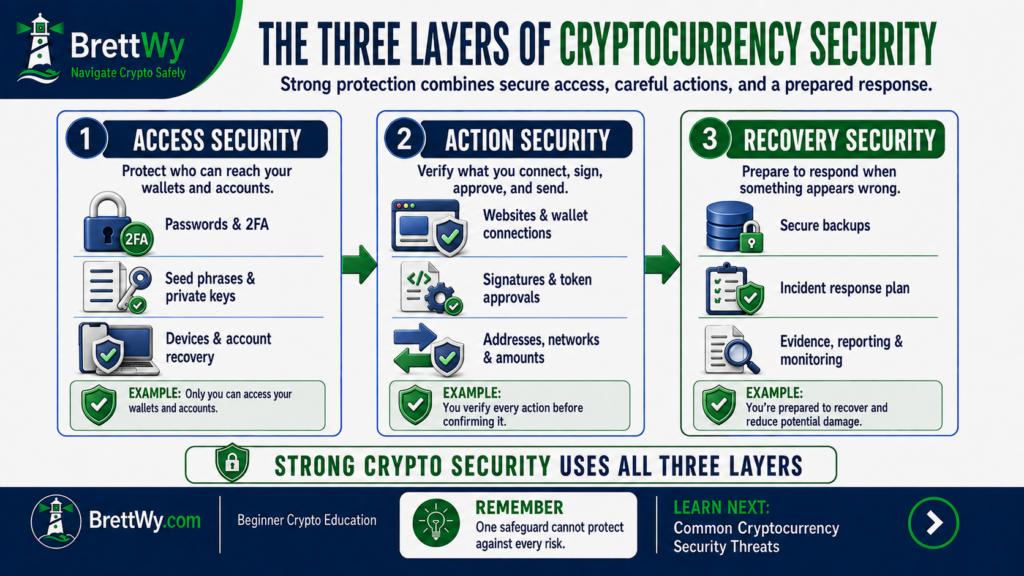
The Three Layers of Cryptocurrency Security
| Security layer | What it protects | Example threat |
|---|---|---|
| Access security | Credentials, wallets, accounts, devices, and recovery information | A stolen password or exposed seed phrase |
| Action security | Transactions, signatures, connections, and approvals | A deceptive wallet request |
| Recovery security | Backups, response steps, records, and remaining assets | A suspected compromise or completed scam |
No layer is enough by itself. Strong account access cannot prevent every transaction a user voluntarily approves, while careful transaction habits cannot restore a lost seed phrase. The goal is to make one mistake less likely to expose everything.
Common Cryptocurrency Security Threats
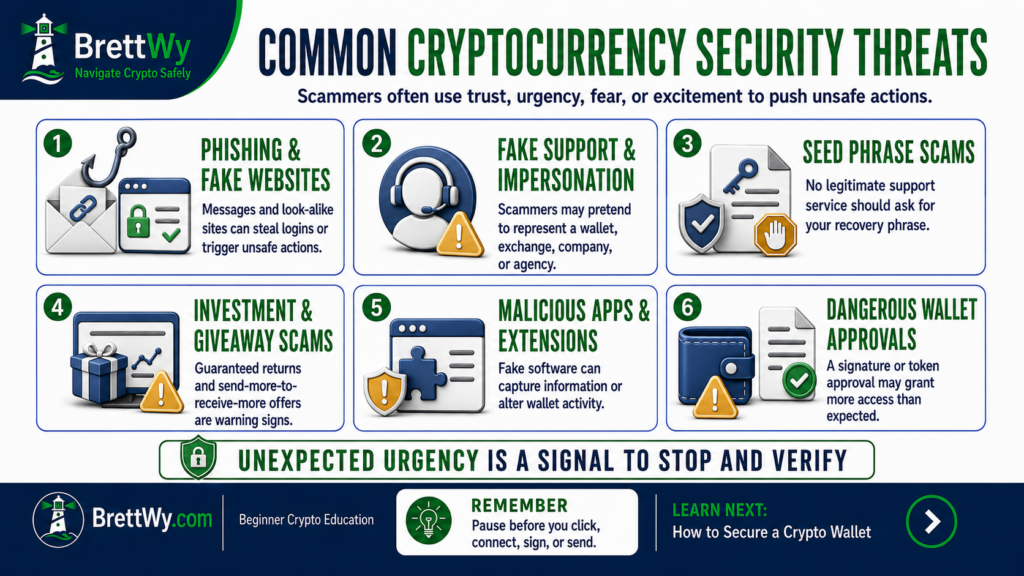
Many successful scams follow the same pattern: the attacker gains attention, creates trust or urgency, and directs the user toward an action that exposes information, grants permission, or transfers crypto.
Phishing Messages and Fake Websites
Phishing is an attempt to trick someone into revealing sensitive information or taking an unsafe action by pretending to be a trustworthy source. It can arrive through email, text, social media, search advertisements, QR codes, or fake websites.
Common warning signs include unexpected contact, urgent language, misspelled domains, unfamiliar senders, requests for secret information, guaranteed rewards, and instructions to move assets for “protection.” Learn how to recognize and avoid phishing scams through the FTC.
Impersonation and Fake Support
A scammer may copy the name, logo, and language of an exchange, wallet provider, project, government agency, or public figure. The supposed representative may ask for a seed phrase, authentication code, remote-device access, payment, or transfer to a “safe” wallet.
End unexpected conversations and contact the organization through a separate, verified channel. Never use the contact information supplied by the person whose identity you are checking.
Investment, Giveaway, and Recovery Scams
Fraudulent platforms may display fake profits, testimonials, account managers, or small early withdrawals to build trust. Later, they may demand taxes, fees, or additional deposits before allowing a withdrawal. Fake giveaways similarly ask users to send crypto, connect a wallet, or pay a fee to receive a larger reward.
No legitimate opportunity can guarantee returns. Review the FTC’s cryptocurrency scam warning signs, and never send more money to unlock or recover a supposed balance.
Malicious Applications and Wallet Requests
A fake wallet, extension, portfolio tracker, or decentralized application can imitate legitimate software. Download software through the verified provider, review its permissions, and avoid files sent through direct messages.
A wallet connection does not automatically transfer assets, but the website may request a signature, token approval, or transaction afterward. Review each request independently.
Address Manipulation and Unexpected Tokens
Cryptocurrency addresses are long and difficult to recognize. Attackers may exploit this by replacing an address copied to the clipboard or sending a small transaction from a look-alike address so it appears in the target wallet’s history.
Do not copy a destination from transaction history without verifying it independently. After pasting an address, compare more than the first and last few characters, confirm the blockchain network, and check the address on the signing device when possible.
An unfamiliar token or NFT may also appear unexpectedly. Its name or description may direct the user to a website that requests a wallet connection. Do not follow links embedded in unknown assets or attempt to sell them immediately. Research independently and use the wallet’s hide or report feature when appropriate.
Account Takeovers
An account takeover occurs when someone gains unauthorized access to an exchange, email account, social-media account, or related service. Entry points can include password reuse, phishing, stolen authentication codes, malicious software, and fraudulent password resets.
Warning signs include unfamiliar login notifications, security changes, new devices, password-reset messages you did not request, and authentication prompts you did not initiate. Deny unexpected prompts and review the account through the official application or website.
How to Protect Your Seed Phrase and Private Keys
A private key authorizes transactions. A seed phrase can restore access to one or more wallet accounts. Someone who obtains either may not need your device, wallet password, or hardware wallet.
Store Recovery Information Safely
- Record every word accurately and in the correct order.
- Keep the backup offline and private.
- Protect it from foreseeable physical damage.
- Do not photograph, screenshot, email, message, or upload it.
- Never enter it into an online “verification” or “wallet cleaning” tool.
- Do not use recovery words supplied with a preconfigured device.
A good backup is accurate, private, and durable. Multiple backups can reduce the risk of losing one copy, but every additional copy creates another location that must remain secure.
Paper and Durable Physical Backups
A paper backup is simple and offline, but it can be damaged by water, fire, humidity, fading, or accidental disposal. A more durable physical backup may resist environmental damage better, although it can still be found, copied, misplaced, or recorded incorrectly.
Durability and secrecy are separate goals. A backup can survive physical damage and still fail if an unauthorized person can read it. Choose a controlled location and periodically confirm that the backup remains readable without entering it into a device.
Plan for Device Loss and Long-Term Access
Consider what would happen if a phone stopped working, a hardware wallet was damaged, or the primary user could no longer manage the wallet. A continuity plan should identify which wallets exist, where essential instructions are maintained, and how authorized recovery can occur.
This does not mean giving someone immediate access to a seed phrase. Instead, it means preventing the entire system from depending on one device, one memory, or one inaccessible location. Significant holdings may require qualified legal and estate-planning guidance.
What If a Seed Phrase Is Exposed?
An exposed seed phrase cannot be made secret again. Changing the wallet application’s password will not remove access from someone who already has the phrase.
- Treat the wallet as potentially compromised.
- Use a trusted, updated device.
- Create a new wallet with newly generated recovery information through a verified setup.
- Protect the new backup before transferring assets.
- Move remaining assets carefully when appropriate.
- Review whether connected applications or accounts were also affected.
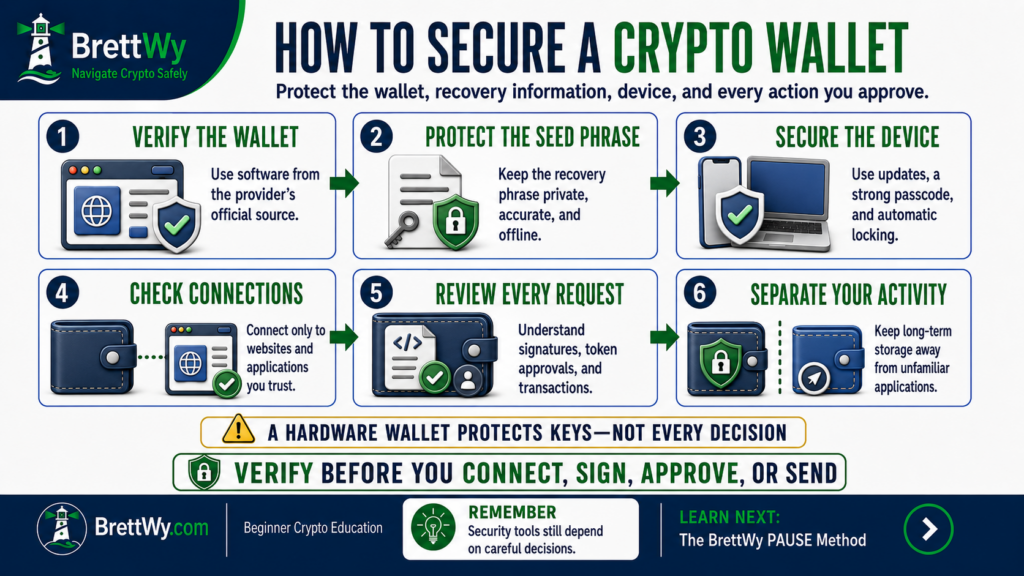
How to Secure a Crypto Wallet
- Install the wallet through its verified provider.
- Use a strong local password or passcode.
- Keep the wallet, browser, and device updated.
- Lock the wallet when it is not in use.
- Verify websites before connecting.
- Read signatures and transaction requests before approval.
- Review old connections and token permissions.
- Separate important assets from experimental activity.
Hot-Wallet and Hardware-Wallet Security
A hot wallet operates on an internet-connected device and can be convenient for regular activity. A hardware wallet separates private keys from an ordinary computer or phone and generally requires confirmation on the physical device.
However, a hardware wallet cannot protect someone who reveals the seed phrase or approves a deceptive transaction. Always verify the recipient, asset, amount, and permission on the trusted device.
A newly initialized device should generate new recovery information privately. Stop if recovery words arrive preprinted, the device appears initialized, a seller supplies the phrase, or setup instructions lead to unofficial software. Do not deposit assets until the device and setup process have been verified.
Separate Storage From Daily Activity
Using one wallet for every purpose exposes all associated assets to the same websites and permissions. A manageable separation model can include a storage wallet with limited connections, an active wallet with a smaller working balance, and an experimental wallet for unfamiliar applications.
Separate wallets cannot make an unsafe application trustworthy. They can, however, limit how much is exposed if one interaction is harmful. Avoid creating more wallets and backups than you can accurately track and maintain.
Connections, Signatures, and Token Approvals
A signature may prove control of an address, sign into an application, authorize an order, or grant permission. No network fee does not necessarily mean no security consequence.
A token approval gives a smart contract permission to use a specified token. Approve only what is necessary where practical, review older permissions, and use an official or trusted interface to review and revoke suspicious token approvals.
How to Secure a Cryptocurrency Exchange Account
An exchange typically controls the private keys associated with assets held through its platform. Users protect access through passwords, email, authentication methods, devices, and withdrawal settings.
- Use a strong password that is unique to the exchange.
- Protect the connected email account separately.
- Enable strong two-factor authentication or passkeys where supported.
- Store authentication backup codes securely.
- Deny login prompts you did not initiate.
- Enable account and withdrawal alerts.
- Review devices, active sessions, withdrawal addresses, and API keys.
- Use approved-address lists and withdrawal safeguards where appropriate.
- Contact support only through verified channels.
Password and Email Security
A unique password prevents a breach at an unrelated service from exposing the exchange through password reuse. A reputable password manager can generate and store unique credentials, but it should also use a strong master password and multifactor authentication.
The connected email account may be able to reset the exchange password, approve a login, or confirm a security change. Protect it with a different password, strong authentication, current recovery information, and regular session reviews. Check for unexpected forwarding rules because attackers sometimes create them to hide account alerts.
Choose Strong Authentication
Security keys and passkeys can provide strong phishing resistance. Authenticator applications generate temporary codes and are generally stronger than relying on a password alone. SMS codes add another barrier but can be exposed through mobile-account compromise.
Use the strongest method the platform supports and you can recover reliably. Never share a current authentication code with someone claiming to be support. If you receive a prompt you did not initiate, deny it and review the account immediately.
Withdrawal Safeguards
Some exchanges offer approved withdrawal-address lists, new-address confirmation, withdrawal delays, security locks, and additional authentication. These controls may slow unauthorized withdrawals, but they must be configured carefully. An approved address that was entered incorrectly or supplied by a scammer remains unsafe.
Understand Custodial Platform Risk
Strong login security does not eliminate platform risk. An exchange may experience a breach, financial failure, withdrawal delay, operational disruption, or regulatory restriction. Cryptocurrency held through an exchange may not receive the same protections as money held in a traditional bank account.
Neither an exchange nor self-custody is risk-free. The better question is which responsibilities and risks the user understands and can manage.
How to Protect Your Devices and Online Accounts
- Keep operating systems, browsers, wallets, and authentication applications updated.
- Use trusted devices with strong passcodes and automatic locking.
- Remove unnecessary applications and browser extensions.
- Avoid public or shared devices for sensitive activity.
- Download software only from verified sources.
- Review cloud synchronization and backup settings.
- Treat unexpected remote-access requests as suspicious.
- Protect the mobile account connected to financial services.
Privacy and Social Engineering
Public information can help a scammer create a convincing message. Avoid broadcasting the exact value of holdings, storage methods, email addresses, mobile numbers, travel plans, or recovery procedures.
Before posting a screenshot, check for wallet addresses, balances, QR codes, account details, browser tabs, and notification previews. You can discuss cryptocurrency without publishing your personal security setup.
Malware and Remote Access
Malicious software may attempt to capture passwords, replace wallet addresses, read browser sessions, or control a device. Reduce exposure by avoiding unexpected attachments, unknown files, unofficial downloads, and software that demands unusually broad permissions.
A fake support representative may request remote access to “fix” an account. Do not provide control of your screen or device to someone who contacts you unexpectedly. An exchange, wallet provider, or government agency should not need to control your device to move crypto into a protected account.
Public Networks and VPN Limits
Avoid sensitive activity on public Wi-Fi and networks with unclear ownership. A VPN can encrypt traffic between a device and the VPN provider, but it cannot make a phishing website, malicious extension, stolen seed phrase, or deceptive transaction safe.
How to Verify a Cryptocurrency Transaction
A wallet confirmation screen is your last opportunity to identify a problem before authorization. Check the action, recipient, blockchain network, asset, amount, permission, and network fee.
After pasting an address, check it again. Malicious software can attempt to replace copied wallet addresses. For a new destination, a small test transaction can help confirm certain technical details, although it cannot prove that the recipient or platform is trustworthy.
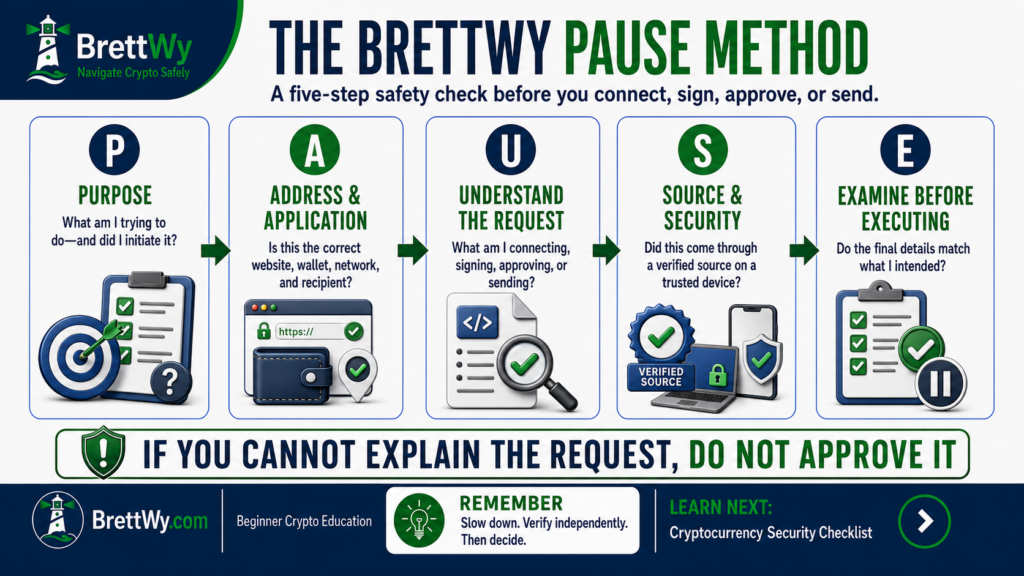
The BrettWy PAUSE Method
| Step | Question |
|---|---|
| P — Purpose | What am I trying to accomplish, and did I initiate this action? |
| A — Address and Application | Is this the correct website, wallet, network, and recipient? |
| U — Understand the Request | What am I signing, sending, connecting, or approving? |
| S — Source and Security | Did the request come through a verified channel on a trusted device? |
| E — Examine Before Executing | Do all final details match my intention? |
How to Build a Personal Cryptocurrency Security System
A good system protects access, verifies actions, preserves recovery options, and remains simple enough to maintain.
- Identify what you use: privately inventory wallets, exchanges, devices, email accounts, and authentication methods without recording secret credentials together.
- Classify the risk: consider value exposed, frequency of use, wallet connections, and consequences of loss.
- Remove single points of failure: avoid one reused password, one vulnerable backup, or one wallet used for everything.
- Separate storage from activity: limit unnecessary connections involving long-term assets.
- Create trusted paths: bookmark verified websites, support pages, and reporting resources before an emergency.
- Define stop conditions: automatically pause after unexpected support, unclear approvals, seed-phrase requests, guaranteed returns, or demands for additional payment.
- Review the system: check sessions, permissions, devices, backups, and recovery information periodically.
The Beginner Security Baseline
- Never share a seed phrase or private key.
- Use unique passwords and strong authentication.
- Verify websites, addresses, networks, and wallet requests.
- Distrust urgency, guaranteed returns, and unsolicited support.
- Stop when you do not understand what you are approving.
What to Do If You Suspect a Compromise
The correct response depends on whether the incident involves a password, email account, authentication method, device, seed phrase, wallet approval, or completed transaction.
The BrettWy Incident-Response Plan
- Stop: stop communicating, sending, signing, connecting, and installing.
- Separate: leave the suspicious website, device, or communication channel.
- Identify: determine which credential, account, wallet, device, or permission may be affected.
- Secure: protect affected accounts and remaining assets through trusted devices and verified channels.
- Save: preserve transaction hashes, addresses, dates, messages, and website information.
- Report: notify the relevant provider, platform, and authorities.
- Watch: monitor affected accounts and remain alert for follow-up recovery scams.
Preserve Evidence and Report Fraud
Save transaction hashes, wallet addresses, asset names, amounts, dates, usernames, messages, and website addresses. Do not include seed phrases, private keys, passwords, or authentication codes in evidence.
In the United States, review the FBI guidance for cryptocurrency scam victims and file a report through the FBI Internet Crime Complaint Center. Suspected fraud can also be reported at ReportFraud.ftc.gov.
Reporting does not guarantee recovery. Be cautious of unsolicited investigators, law firms, hackers, or recovery services that demand fees or sensitive information.
Match the Response to the Compromise
If a password may be exposed: change it through the official service on a trusted device, end unknown sessions, review security settings, and change it anywhere it was reused.
If an email account may be compromised: change its password, review active sessions, authentication methods, recovery details, forwarding rules, filters, and connected applications. Then inspect accounts that rely on that email.
If a seed phrase may be exposed: treat the wallet as compromised. A password change is not enough. Create a new wallet through a verified process on a trusted device and move remaining assets carefully when appropriate.
If a suspicious token permission was approved: stop using the website, review approvals through a trusted interface, and revoke the relevant permission where appropriate. Revocation may prevent future use of a permission, but it cannot reverse a transfer that already occurred.
If crypto was sent to a scammer: stop sending, record the transaction hash and destination address, contact the relevant provider, report the incident, and prepare for follow-up recovery scams.
If a device may be compromised: stop using it for sensitive activity, secure important accounts from a separate trusted device, and obtain qualified technical help before entering new wallet recovery information.
Common Cryptocurrency Security Mistakes
- Sharing a seed phrase or private key
- Photographing or uploading recovery information
- Reusing passwords
- Relying on a password alone
- Trusting urgent messages or unsolicited support
- Clicking a search advertisement without verifying the domain
- Approving wallet requests without reading them
- Using one wallet for storage and every application
- Assuming a hardware wallet prevents every mistake
- Ignoring email, device, and mobile-account security
- Paying more money to recover or unlock funds
- Creating a system too complicated to maintain
Master Cryptocurrency Security Checklist
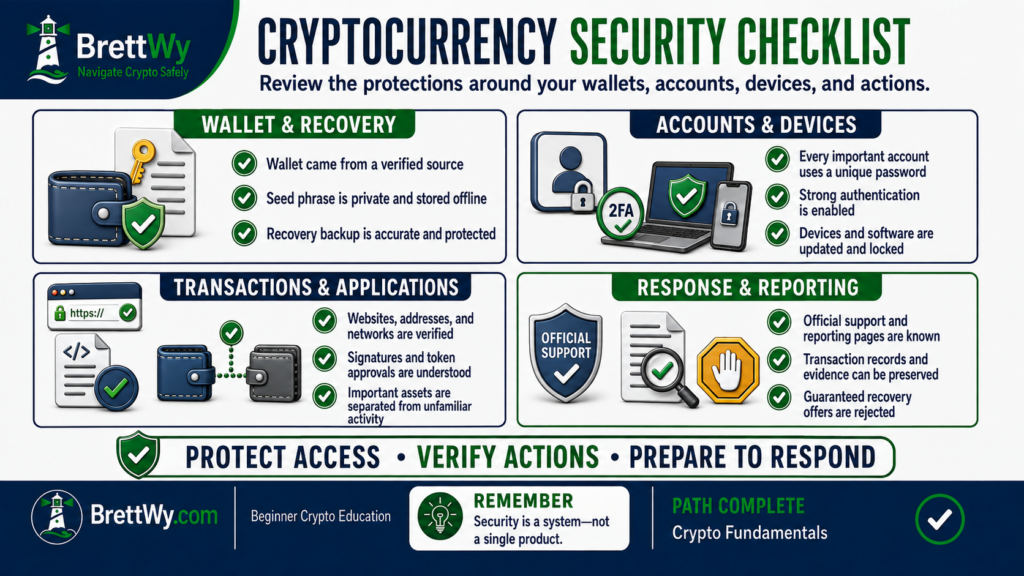
Wallet and recovery
- My wallet came from a verified source.
- New recovery information was generated privately.
- My seed phrase is accurate, offline, and protected.
- Nobody else knows my seed phrase or private keys.
Accounts and devices
- Important accounts use unique passwords and strong authentication.
- Email, mobile, and recovery settings are protected.
- Devices, browsers, wallets, and extensions are current.
- Unknown sessions, applications, and API keys have been removed.
Transactions and applications
- I verify websites, addresses, networks, assets, and amounts.
- I read signatures and token approvals before authorizing them.
- Important assets are separated from unfamiliar activity.
- Unexpected requests trigger a mandatory pause.
Recovery
- Official support and reporting pages are bookmarked.
- I know how to respond to an exposed password, seed phrase, or device.
- I preserve transaction records after suspected fraud.
- I reject guaranteed recovery offers.
Key Takeaways
- Cryptocurrency security protects the tools and authority that control digital assets.
- Blockchain security does not automatically protect an individual user.
- Seed phrases and private keys must remain private.
- Custodial and self-custody methods create different responsibilities.
- Access, action, and recovery security work together.
- Wallet confirmations should be treated as security checkpoints.
- Scammers frequently rely on urgency, impersonation, secrecy, and unrealistic promises.
- Separating storage from active use can limit exposure.
- No security method removes every risk.
Frequently Asked Questions About Cryptocurrency Security
What is cryptocurrency security?
Cryptocurrency security is the process of protecting the wallets, accounts, private keys, seed phrases, devices, and actions that control access to digital assets.
Can cryptocurrency be hacked?
Wallets, exchanges, devices, and applications can be compromised. However, that does not necessarily mean the underlying blockchain was hacked. Many losses result from phishing, stolen credentials, exposed seed phrases, or deceptive transactions.
Can I give my seed phrase to customer support?
No. A legitimate support representative should not need your seed phrase or private keys.
Is a hardware wallet completely safe?
No security tool is completely safe. A hardware wallet can isolate private keys, but it cannot protect a user who reveals the seed phrase or approves a harmful transaction.
Can a cryptocurrency transaction be reversed?
Confirmed cryptocurrency transactions are generally difficult to reverse because most public blockchains do not have a central administrator who can cancel them.
Does disconnecting a wallet remove token approvals?
Not necessarily. Disconnecting usually removes the current website connection, while an earlier smart-contract permission may remain active until it is revoked through an appropriate blockchain transaction.
What should I do if my seed phrase is exposed?
Treat the wallet as compromised. Create a new wallet with a new seed phrase through a verified setup on a trusted device, protect the new backup, and carefully move remaining assets when appropriate.
Do I need to be a cybersecurity expert?
No. Beginners benefit most from protecting recovery information, using unique passwords, enabling strong authentication, verifying every request, and stopping when an action is unclear.
Test Your Knowledge
- What information can restore control of a self-custody wallet?
- Why does blockchain security not automatically protect an individual user?
- What should you do when a wallet request is unclear?
- Does disconnecting a website automatically remove existing token approvals?
- What five areas make up the BrettWy Cryptocurrency Security Framework?
Check your answers
- The wallet’s seed phrase or equivalent recovery information.
- Users can still lose access through stolen credentials, phishing, malicious approvals, unsafe devices, or mistakes.
- Reject it and verify the website, request, and intended action independently.
- No. Earlier permissions may remain active until the user revokes them through an appropriate blockchain transaction.
- Access, devices, actions, separation, and response.
Official Resources
- 2025 Internet Crime Report — FBI Internet Crime Complaint Center
- Ethereum Security and Scam Prevention
- Recognize and Report Phishing — CISA
- Cryptocurrency and Scams — Federal Trade Commission
- How to Revoke Smart-Contract Access — Ethereum.org
Official resources can change, so confirm current instructions through the organization’s verified website before taking action.
Final Thoughts
In summary, cryptocurrency security is a system—not a single device, password, wallet, or product. Strong protection combines secure access, maintained devices, careful transaction review, limited exposure, and a prepared response plan.
Beginners do not need to move quickly. Instead, they should pause when something feels urgent, verify unfamiliar requests independently, and avoid approving any action they cannot explain.
The Most Important Lesson — Protect access, verify every action, and prepare for recovery before a problem occurs.
You’ve Completed the Crypto Fundamentals Learning Path
You now understand cryptocurrency, blockchains, Bitcoin, Ethereum, smart contracts, DeFi, wallets, stablecoins, Web3, and the security practices that connect them.
Completion does not mean you need to buy, transfer, or connect anything. Use this learning path as a reference, continue learning gradually, and make decisions only when you understand the tools and risks involved.
Crypto Fundamentals Path Progress: You have completed all ten guides in the BrettWy Crypto Fundamentals Learning Path.
LEARN NEXT
Review the Complete Beginner’s Guide to Cryptocurrency
Return to the cornerstone guide whenever you want to review the complete foundation or revisit a specific topic.
Final BrettWy Lesson: The goal is not to move through cryptocurrency quickly. The goal is to understand what you are doing and navigate it more safely.
About This Content
BrettWy creates beginner-friendly cryptocurrency education with a focus on clear explanations, practical security, and understanding risk. Content is developed with AI assistance, and relevant sources are linked so readers can explore the underlying information.
Crypto products, services, and technical guidance can change. Check current information with the original source before taking action.
Found an error or outdated information? Email info@brettwy.com with the article URL and the detail you believe needs attention. Never include passwords, private keys, or recovery phrases.
Educational and Risk Disclaimer
For clarity, BrettWy provides this article for general educational and informational purposes only. It does not constitute financial, investment, legal, tax, accounting, cybersecurity, or other professional advice.
In addition, cryptocurrency, self-custody wallets, exchanges, smart contracts, devices, accounts, and blockchain applications involve significant risks. These risks include fraud, malicious approvals, software vulnerabilities, platform failure, irreversible transactions, loss of access, and permanent financial loss.
Finally, no wallet, device, authentication method, audit, backup, or security practice can eliminate every risk or guarantee recovery. Verify current information through official sources and consult qualified professionals when appropriate.